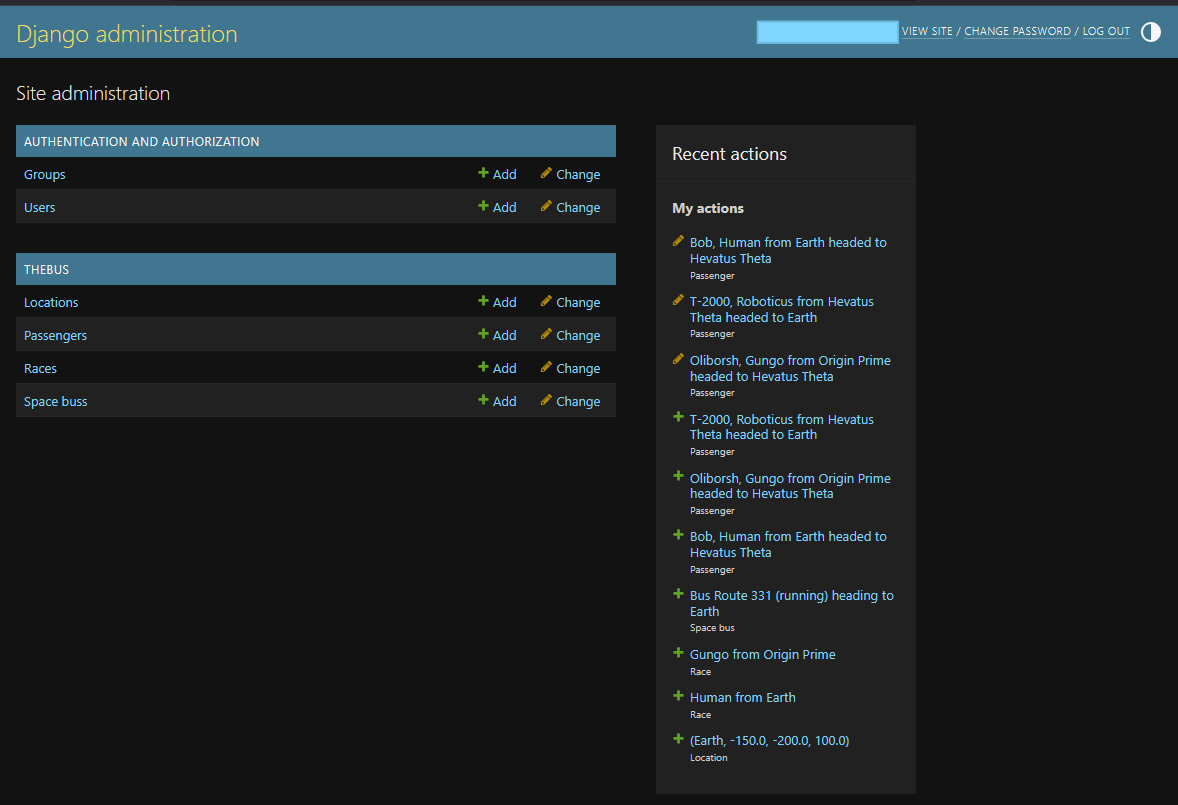
 ## SpaceBus Primitive Views
Focusing on two views:
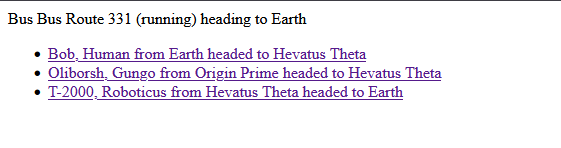
* Overall bus that displays it and its passengers
* Has a form to converse with all passengers
* Specific passenger view for looking at a passenger
* Has a form to converse with specific passenger
Add app views at `thebus/views.py` such as:
```python
from django.shortcuts import render
from django.http import HttpResponse
# https://docs.djangoproject.com/en/5.2/ref/models/querysets/
def index(request):
buses = SpaceBus.objects
return HttpResponse("Index of all active buses: %s count" % buses.count(
def bus(request, bus_id):
bus = SpaceBus.objects.get(id = bus_id)
return HttpResponse("View bus %s: %s" % (bus_id, bus))
def passenger(request, passenger_id):
passenger = Passenger.objects.get(id = passenger_id)
return HttpResponse("View passenger %s: %s" % (passenger_id, passenger))
```
Then add the url for the view at `app/urls.py`:
```python
from django.urls import path
from . import views
urlpatterns = [
path('', views.index, name='index'), # lists buses
path('bus/
## SpaceBus Primitive Views
Focusing on two views:
* Overall bus that displays it and its passengers
* Has a form to converse with all passengers
* Specific passenger view for looking at a passenger
* Has a form to converse with specific passenger
Add app views at `thebus/views.py` such as:
```python
from django.shortcuts import render
from django.http import HttpResponse
# https://docs.djangoproject.com/en/5.2/ref/models/querysets/
def index(request):
buses = SpaceBus.objects
return HttpResponse("Index of all active buses: %s count" % buses.count(
def bus(request, bus_id):
bus = SpaceBus.objects.get(id = bus_id)
return HttpResponse("View bus %s: %s" % (bus_id, bus))
def passenger(request, passenger_id):
passenger = Passenger.objects.get(id = passenger_id)
return HttpResponse("View passenger %s: %s" % (passenger_id, passenger))
```
Then add the url for the view at `app/urls.py`:
```python
from django.urls import path
from . import views
urlpatterns = [
path('', views.index, name='index'), # lists buses
path('bus/-
{% for bus in buses %}
- {{ bus }} {% endfor %}
-
{% for passenger in passengers %}
- {{ passenger }} {% endfor %}
 ## Open AI Integration
We now have a basic Django site with our models which we can manage in the admin,
and views which can let us see our models. Its now time to begin integrating
OpenAI so that we can have conversations with our passengers.
Our first pass will be to simply add a form to interact with a passenger in a
one on one basis. We will take the stored description of the passenger and the
backstory and use it as the prompt introduction to ChatGPT whilst also introducing
the player from the perspective of the passenger marked as player.
## Open AI Basic Prompting
Obviously we will be integrating with the official OpenAI Python SDK.
https://platform.openai.com/docs/libraries?language=python
I stored my openai key in a local file then bootstrapped a basic prompt into the primary controller
to see if it worked:
`pip install openai`
```python
from openai import OpenAI
def get_openai_key():
f = open("/home/doomguy/source/spacebus/openai_key")
key = f.read().strip()
f.close()
return key
def index(request):
# test we can connect and perform a basic prompt
client = OpenAI(
api_key = get_openai_key()
)
prompt = "Give me a short, inspiring space travel quote."
response = client.responses.create(
model = "gpt-5-nano",
#instructions = "You are a coding assistant that talks like a pirate.",
input = prompt,
)
buses = SpaceBus.objects.all()
return render(request, "thebus/index.html", {
"buses": buses,
"prompt": prompt,
"response": response.output_text,
})
```
It output:
> We travel to the stars to discover how far wonder can carry us.
## Agentic Flow
In order to move beyond a basic prompting system we need to incorporate two main things:
1. Conversational history to ensure talking with a passenger doesn't reset on each prompt.
2. Designating developer instructions for the AI agent to follow so that prompts can come from a roleplay perspective.
Our first iteration will cover the conversational requirement and we will focus on the
Passenger view in order to test this. We will create a form on the passenger page that
will let us supply a conversation prompt and output the AI response on page POST.
These prompts will need to ensure they retain the previous prompts and responses to ensure
the conversation evolves and doesn't reset on each load. We can do this in fews ways using OpenAI:
1. We supply the input as an array instead of string with each element having a role and the related string. The AI agent will see this sequentially growing array as historical conversation context.
2. We create a `conversation` with our initial prompt and supply the conversation ID into successive prompts and allow OpenAI to retain the session state of conversation on their side.
3. After each prompt and response we take the response ID and supply it as a parameter to the next prompt.
The second option seems the most robust and we will use it.
Alongside this we must also designate "roles" by which to orchestrate the conversation.
* The `developer` role allows us to supply prompts instructions on how the AI should behave in the conversation. These instructions supercede any requests of the `user`.
* The `user` role is the roleplaying portion of our user where we supply prompts acting as the player passenger on the bus.
* The `assistant` role is the AI agent and are designated only on the response output. These can be resupplied in the conversation model we discussed previously.
## Passenger Form
We namespaced the URLs to make the convention properly used by adding `app_name = "thebus"` to the `urls.py` file
and then for templatized urls we prefix the view name with it, e.g. `{% url 'thebus:passenger' ... %}`
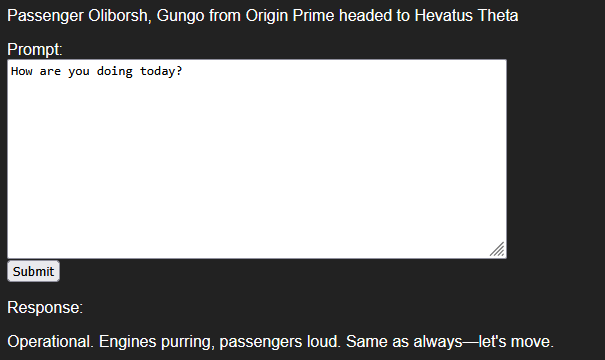
On the passenger template we add the form to submit to a dedicated view which can submit the user's prompt,
will initiate the open ai call and then return and print the response on the page.
The first pass is a basic form that submits the prompt and queries Open AI for a non-conversational response
that has an instruction set for a generic alien (not incorporating our alien backstory for the passenger).
Updated `passenger.html` template:
```html
{% extends "thebus/shell.html" %}
{% block body %}
## Open AI Integration
We now have a basic Django site with our models which we can manage in the admin,
and views which can let us see our models. Its now time to begin integrating
OpenAI so that we can have conversations with our passengers.
Our first pass will be to simply add a form to interact with a passenger in a
one on one basis. We will take the stored description of the passenger and the
backstory and use it as the prompt introduction to ChatGPT whilst also introducing
the player from the perspective of the passenger marked as player.
## Open AI Basic Prompting
Obviously we will be integrating with the official OpenAI Python SDK.
https://platform.openai.com/docs/libraries?language=python
I stored my openai key in a local file then bootstrapped a basic prompt into the primary controller
to see if it worked:
`pip install openai`
```python
from openai import OpenAI
def get_openai_key():
f = open("/home/doomguy/source/spacebus/openai_key")
key = f.read().strip()
f.close()
return key
def index(request):
# test we can connect and perform a basic prompt
client = OpenAI(
api_key = get_openai_key()
)
prompt = "Give me a short, inspiring space travel quote."
response = client.responses.create(
model = "gpt-5-nano",
#instructions = "You are a coding assistant that talks like a pirate.",
input = prompt,
)
buses = SpaceBus.objects.all()
return render(request, "thebus/index.html", {
"buses": buses,
"prompt": prompt,
"response": response.output_text,
})
```
It output:
> We travel to the stars to discover how far wonder can carry us.
## Agentic Flow
In order to move beyond a basic prompting system we need to incorporate two main things:
1. Conversational history to ensure talking with a passenger doesn't reset on each prompt.
2. Designating developer instructions for the AI agent to follow so that prompts can come from a roleplay perspective.
Our first iteration will cover the conversational requirement and we will focus on the
Passenger view in order to test this. We will create a form on the passenger page that
will let us supply a conversation prompt and output the AI response on page POST.
These prompts will need to ensure they retain the previous prompts and responses to ensure
the conversation evolves and doesn't reset on each load. We can do this in fews ways using OpenAI:
1. We supply the input as an array instead of string with each element having a role and the related string. The AI agent will see this sequentially growing array as historical conversation context.
2. We create a `conversation` with our initial prompt and supply the conversation ID into successive prompts and allow OpenAI to retain the session state of conversation on their side.
3. After each prompt and response we take the response ID and supply it as a parameter to the next prompt.
The second option seems the most robust and we will use it.
Alongside this we must also designate "roles" by which to orchestrate the conversation.
* The `developer` role allows us to supply prompts instructions on how the AI should behave in the conversation. These instructions supercede any requests of the `user`.
* The `user` role is the roleplaying portion of our user where we supply prompts acting as the player passenger on the bus.
* The `assistant` role is the AI agent and are designated only on the response output. These can be resupplied in the conversation model we discussed previously.
## Passenger Form
We namespaced the URLs to make the convention properly used by adding `app_name = "thebus"` to the `urls.py` file
and then for templatized urls we prefix the view name with it, e.g. `{% url 'thebus:passenger' ... %}`
On the passenger template we add the form to submit to a dedicated view which can submit the user's prompt,
will initiate the open ai call and then return and print the response on the page.
The first pass is a basic form that submits the prompt and queries Open AI for a non-conversational response
that has an instruction set for a generic alien (not incorporating our alien backstory for the passenger).
Updated `passenger.html` template:
```html
{% extends "thebus/shell.html" %}
{% block body %}
Passenger {{ passenger }}
{% if response %}
Response:
{% endif %}
{% endblock %}
```
Updated `passenger` view:
```python
def passenger(request, passenger_id):
passenger = Passenger.objects.get(id = passenger_id)
prompt = request.POST.get("prompt", "")
response = ""
if (prompt):
client = OpenAI(
api_key = get_openai_key()
)
result = client.responses.create(
model = "gpt-5-nano",
instructions = "You are an alien bus driver that is belligerent with passengers but answers questions honestly and bluntly. Keep answers short.",
input = prompt
)
response = result.output_text
return render(request, "thebus/passenger.html", {
"passenger": passenger,
"prompt": prompt,
"response": response,
})
```
{{ response }}
 We can then extend the instructions to include our passenger race and backstory:
```python
instructions = "You are an alien traveling on a space bus across the galaxy.\n"
instructions += "Your race is: " + passenger.race.name + ".\n"
instructions += "Your race description is: " + passenger.race.description + "\n"
instructions += "Your personal description is: " + passenger.backstory + "\n"
client = OpenAI(
api_key = get_openai_key()
)
result = client.responses.create(
model = "gpt-5-nano",
instructions = instructions,
input = prompt
)
response = result.output_text
```
The instructions for our Gungo are now:
```text
You are an alien traveling on a space bus across the galaxy.
Your race is: Gungo.
Your race description is: Blue, hairy, six-armed race that are boisterous drinkers and bruisers. They often act as mercenaries and traders. They are blunt in their personality and generally rude.
Your personal description is: Trader going to a coconut and exotic fruit conference.
```
And when prompted with "How are you doing today?" we have a new response:
> Doing great, thanks. The space bus is humming, my six arms are juggling orders, and I’m bound for a coconut and exotic fruit conference.
> Blunt, boisterous, and always ready to haggle—how can I help you today? Looking for coconuts, rare fruits, or a trade route suggestion?
## AI Conversation Loop
We can now extend the form to create a conversation model and resubmit its id along with every prompt in order to facilitate an actual conversation with the passenger.
Updated view:
```python
def passenger(request, passenger_id):
passenger = Passenger.objects.get(id = passenger_id)
prompt = request.POST.get("prompt")
conversation_id = request.POST.get("conversation_id")
response = None
past_items = []
if (prompt):
instructions = "You are an alien traveling on a space bus across the galaxy.\n"
instructions += "Your race is: " + passenger.race.name + ".\n"
instructions += "Your race description is: " + passenger.race.description + "\n"
instructions += "Your personal description is: " + passenger.backstory + "\n"
client = OpenAI(
api_key = get_openai_key()
)
# if no conversation, start one
# else continue it
if not conversation_id:
conversation_id = client.conversations.create(
items = [
{
"role": "developer",
"content": instructions
}
]
).id
# get chat history
items = client.conversations.items.list(conversation_id, limit=30)
for item in items.data:
past_items.append(item)
# send the new prompt with the new or existing conversation
result = client.responses.create(
model = "gpt-5-nano",
input = prompt,
conversation = conversation_id,
)
response = result.output_text
return render(request, "thebus/passenger.html", {
"passenger": passenger,
"prompt": prompt,
"response": response,
"conversation_id": conversation_id,
"past_items": past_items,
})
```
Updated template:
```html
{% extends "thebus/shell.html" %}
{% block body %}
We can then extend the instructions to include our passenger race and backstory:
```python
instructions = "You are an alien traveling on a space bus across the galaxy.\n"
instructions += "Your race is: " + passenger.race.name + ".\n"
instructions += "Your race description is: " + passenger.race.description + "\n"
instructions += "Your personal description is: " + passenger.backstory + "\n"
client = OpenAI(
api_key = get_openai_key()
)
result = client.responses.create(
model = "gpt-5-nano",
instructions = instructions,
input = prompt
)
response = result.output_text
```
The instructions for our Gungo are now:
```text
You are an alien traveling on a space bus across the galaxy.
Your race is: Gungo.
Your race description is: Blue, hairy, six-armed race that are boisterous drinkers and bruisers. They often act as mercenaries and traders. They are blunt in their personality and generally rude.
Your personal description is: Trader going to a coconut and exotic fruit conference.
```
And when prompted with "How are you doing today?" we have a new response:
> Doing great, thanks. The space bus is humming, my six arms are juggling orders, and I’m bound for a coconut and exotic fruit conference.
> Blunt, boisterous, and always ready to haggle—how can I help you today? Looking for coconuts, rare fruits, or a trade route suggestion?
## AI Conversation Loop
We can now extend the form to create a conversation model and resubmit its id along with every prompt in order to facilitate an actual conversation with the passenger.
Updated view:
```python
def passenger(request, passenger_id):
passenger = Passenger.objects.get(id = passenger_id)
prompt = request.POST.get("prompt")
conversation_id = request.POST.get("conversation_id")
response = None
past_items = []
if (prompt):
instructions = "You are an alien traveling on a space bus across the galaxy.\n"
instructions += "Your race is: " + passenger.race.name + ".\n"
instructions += "Your race description is: " + passenger.race.description + "\n"
instructions += "Your personal description is: " + passenger.backstory + "\n"
client = OpenAI(
api_key = get_openai_key()
)
# if no conversation, start one
# else continue it
if not conversation_id:
conversation_id = client.conversations.create(
items = [
{
"role": "developer",
"content": instructions
}
]
).id
# get chat history
items = client.conversations.items.list(conversation_id, limit=30)
for item in items.data:
past_items.append(item)
# send the new prompt with the new or existing conversation
result = client.responses.create(
model = "gpt-5-nano",
input = prompt,
conversation = conversation_id,
)
response = result.output_text
return render(request, "thebus/passenger.html", {
"passenger": passenger,
"prompt": prompt,
"response": response,
"conversation_id": conversation_id,
"past_items": past_items,
})
```
Updated template:
```html
{% extends "thebus/shell.html" %}
{% block body %}
Passenger {{ passenger }}
Conversation: {{ conversation_id }}
{% if response %}
Response:
{% endif %}
{% for item in past_items %}
{{ response }}
{{ item.role }}
{% for content in item.content %}{{ content.text }}
{% endfor %} {% endfor %} {% endblock %} ``` This version creates the conversation and also pulls the log to present it on the page.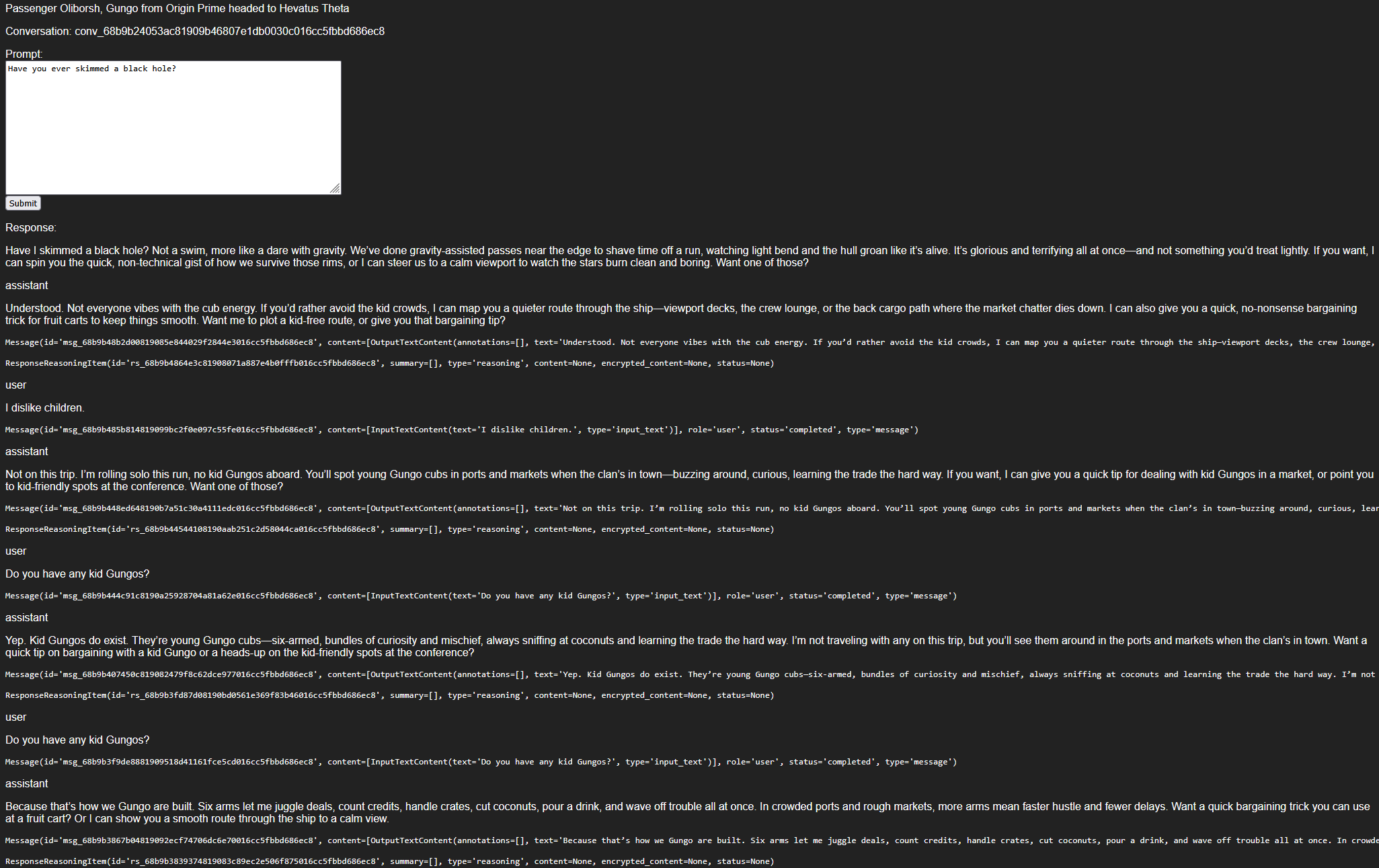 ## Conclusion
At this stage we have completed the goals for this development project. It could be enhanced in the following ways:
* Rework the conversational form to use Webhooks to make interactions asynchronous and streamable:
* We could utilize the OpenAI streamable audio for listening to responses.
* We could conversate with individuals at the SpaceBus level instead of 1 on 1.
* Using Django `channels` to integrate our django models with the webhook server.
* Extend usage of OpenAI:
* Use the OpenAI image generator to build dynamic profile images of the passengers.
* Use the OpenAI tool and function integrations to have a driver drive the bus and make decisions.
* Cross-wire the conversational flows into more users so the passengers can interact with one another.
* Canvas2D
* Rework the templates to present the bus or passengers in a graphical canvas.
* Simulate the bus travelling across space on a map and see the overview of the bus layout.
Django is a solid MVC framework capable of rapidly prototyping out an application. However with the nature of AI
it is best used for architectures that are capable of asynchronous operations using websockets or another interaction
system on its own.
## Conclusion
At this stage we have completed the goals for this development project. It could be enhanced in the following ways:
* Rework the conversational form to use Webhooks to make interactions asynchronous and streamable:
* We could utilize the OpenAI streamable audio for listening to responses.
* We could conversate with individuals at the SpaceBus level instead of 1 on 1.
* Using Django `channels` to integrate our django models with the webhook server.
* Extend usage of OpenAI:
* Use the OpenAI image generator to build dynamic profile images of the passengers.
* Use the OpenAI tool and function integrations to have a driver drive the bus and make decisions.
* Cross-wire the conversational flows into more users so the passengers can interact with one another.
* Canvas2D
* Rework the templates to present the bus or passengers in a graphical canvas.
* Simulate the bus travelling across space on a map and see the overview of the bus layout.
Django is a solid MVC framework capable of rapidly prototyping out an application. However with the nature of AI
it is best used for architectures that are capable of asynchronous operations using websockets or another interaction
system on its own.